
Training Outcomes Within Your Budget!
We ensure quality, budget-alignment, and timely delivery by our expert instructors.
Table of Content
Recent Blogs
Azure AZ-104 Exam Study Guide: Pass on First Attempt
August 20th, 2026
AWS SysOps Administrator Certification Guide
August 20th, 2026
Cloud Computing Salary Guide 2026: AWS, Azure & GCP
August 20th, 2026
CompTIA Cloud+ Certification: Complete Guide
August 20th, 2026
ISO 31000 vs ISO 27001
August 20th, 2026
CISM Certification Cost and Roadmap for Career Success
August 19th, 2026
CISSP Exam Format & Domains
August 19th, 2026
Closer Look at CISSP Requirements That Truly Matter Most
August 19th, 2026
CISSP Certification Path Steps For Aspiring Security Leaders
August 19th, 2026
CISSP Certification Benefits That Support Career Growth
August 19th, 2026
AWS DevOps Engineer Certification: Complete Guide
August 18th, 2026
AWS Developer Certification: Study Guide & Exam Tips
August 18th, 2026
ISO 22000 Documentation Requirements
August 18th, 2026
ISO 22000 vs HACCP
August 17th, 2026
PMP Exam July 2026: What's Changed and How to Prepare
August 17th, 2026
What is Microsoft Word: Definition, Features and Uses Explained
Last updated on August 10th, 2026
- Share
-

-

-

-

-

 Sachin Kumar
Microsoft Word is a document creation and editing software program developed by Microsoft. It allows users to create professional written documents on a computer.
What Is MS Word? Your Complete Microsoft Word Information
Introduction
Microsoft Word is essential for creating professional, well-structured documents. From school assignments to corporate reports and legal agreements, Microsoft Word helps users organize and present ideas clearly and efficiently, reflecting modern standards of workplace productivity. Understanding Microsoft Word fundamentals enhances document quality, collaboration, and overall efficiency, showing why it remains at the global standard.
What Is Microsoft Word?
To answer the question what is Microsoft word in simple terms:
Microsoft Word is a document creation and editing software program developed by Microsoft. It allows users to create professional written documents on a computer. It has defined the standard for how a business letter looks, how a resume is structured, and how multi-billion-dollar contracts are negotiated through "redlining."
When describing the Microsoft Word definition and uses, it helps to think of it as a structured writing platform. It is designed to organize text, apply formatting, and prepare documents for printing or digital sharing. It provides a "What You See Is What You Get" (WYSIWYG) interface, meaning the document on your screen will look the same when it is printed on a piece of paper or exported as a PDF.
Many refer to it as a Microsoft word processor. A Microsoft word processor is software built specifically for handling written text. Unlike basic text editors, it includes layout controls, templates, design tools, and collaboration features. While a text editor like Notepad is used for raw code or simple notes, a Microsoft word processor is used when the visual presentation and structural integrity of the document are just as important as the words themselves.

What Type of Software Is Microsoft Word?
If you're filling out a software inventory or a job application and see the question, "What type of software is Microsoft Word?" The technical answer is "Productivity Software." It belongs to the broader category of office suites, specifically Microsoft 365.
In the U.S. economy, productivity is everything. This software is the engine that drives:
- Legal Services: Drafting briefs and agreements.
- Healthcare: Creating patient forms and compliance guides.
- Tech and SaaS: Writing white papers and technical documentation.
- Education: Developing curricula and research reports.
You can run it as a standalone app on your desktop or use the web-based version through a browser. This flexibility is why it remains the dominant force in American offices.
The Evolution of Microsoft Word
Word didn't start as the powerhouse today. When it launched in 1983, it was a simple tool meant to replace the typewriter. It took years of iteration moving from MS-DOS to the graphical world of Windows to become the "Ribbon-based" interface we recognize now.
In the 90s, it became the corporate standard. By the 2010s, it shifted toward the cloud, allowing people to work together in the same file at the same time. Today, it’s an ecosystem that uses AI to check your tone and cloud storage to make sure you never lose a draft.
Microsoft Word Definition and Uses in Business
The true Microsoft Word definition and uses are found in the busy office. It’s not about "typing"; it’s about "document management."
Consider how a U.S. marketing firm might use it:
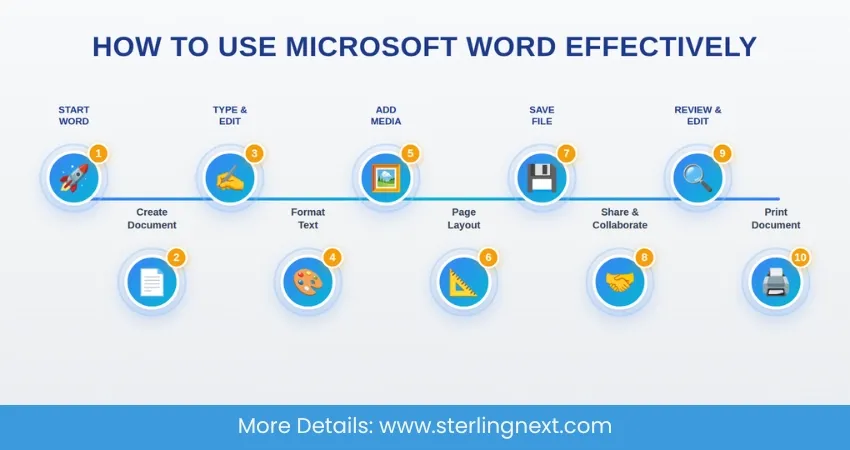
- 1. They start with a Microsoft word document to brainstorm a campaign.
- 2. They use "Styles" to ensure the headings match the client’s brand.
- 3. They use "Track Changes" to let the legal team review the fine print.
- 4. Finally, they export it as a PDF for the client to sign.
A professional Microsoft word document signals that you are serious. A document with inconsistent fonts or poor spacing makes a business look disorganized. Word prevents those mistakes.
What Is a Word Document?
"I'll send you the Word doc." It’s a phrase heard a thousand times a day. But what is a Word document exactly?
Technically, it is a file ending in .docx.
- Rich text (bold, italics, various fonts).
- High-resolution images and logos.
- Tables for pricing or schedules.
- Hyperlinks to external websites.
- Metadata includes the author’s name and the date it was created.
So, when someone asks what is a word document, you’re describing a universal format for information exchange. Because nearly everyone has a way to open a .docx file, it’s the safest way to send a resume or a report without worrying about formatting errors on the other end.
Characteristics of MS Word
The characteristics of MS Word are built for heavy lifters.
- Consistency: Using templates ensures every memo from your company looks the same.
- Reviewability: The "Comment" and "Track Changes" features are unmatched for collaborative editing.
- Automation: Features like "Mail Merge" allow you to send 500 personalized letters in minutes.
- Security: You can password-protect a file or restrict it, so others can only "read" but not "edit."
These characteristics of MS Word make it indispensable for high-stakes environments where an error in a contract could cost thousands of dollars.
Features and Functions of MS Word
The features and functions of MS word range from the basic to the highly technical. Most users only scratch the surface.
Professional Formatting
You don't just change the font size; you apply "Styles." This tells the program what is a "Heading 1" and what is "Body Text." If you decide to change the look of your 100-page report, you change the Style once, and the whole document updates.
Page Layout and Structure
For U.S. business reports, layout is key. Word lets you manage:
- Section Breaks: Have a portrait-oriented page right next to a landscape-oriented page.
- Columns: Perfect for newsletters or brochures.
- Headers/Footers: Essential for keeping your logo and page numbers on every sheet.
Advanced Citations
For the academic and legal sectors, the features and functions of MS Word include automated biographies and tables of authorities. This saves hours of manual work and prevents citation errors.
For professionals working in regulated industries, document accuracy and formatting consistency are critical. Features such as Track Changes, structured styles, and automated references help maintain clarity during audits and compliance reviews. This becomes especially relevant when preparing formal documentation for certifications, like the structured reporting discussed in the guide on how to prepare for an ISO 9001 Lead Auditor interview, where proper documentation standards directly impact audit outcomes.
MS Word Tools Used in Daily Work
Daily productivity relies on a specific set of MS Word tools. These are the "power buttons" that save time.
The Review Tab
This is where real work happens in a team. "Track Changes" allows to see exactly what you're deleted or added. You can "Accept" or "Reject" these changes one by one. It’s like a digital conversation about text.
The Insert Tab
Documents aren't just text anymore. These MS Word tools let you in:
- SmartArt: For creating quick charts or process flows.
- Cross-references: Which tell the reader to "See page 12" and update automatically if the page numbers change.
- Screenshots: Allowing you to snap a window on your computer and drop it directly into your training manual.
Modern Word Processing Capabilities
If you are working with a team in different time zones, "Co-authoring" lets everyone edit the same document simultaneously. You can see your colleague’s cursor moving in real-time. Plus, with "Version History," you can roll back to a version of the file three days ago if someone accidentally deletes a paragraph. These Modern Word processing capabilities have completely changed the speed of business.
Microsoft Word AI Integration
One of the most recent improvements is Microsoft Word AI integration. This isn't just about robots writing for you; it's about making your own writing more effective.
The software now uses Microsoft Word AI integration to:
- Catching complex errors that standard spell-check misses.
- Identify the "non-inclusive" language.
- Rewrite sentences to be more formal or more casual, depending on your goal.
Microsoft 365 Editor
One specific part of that AI is the Microsoft 365 Editor. It’s like having a professional proofreader standing over your shoulder.
The Microsoft 365 editor goes beyond basic red lines for typos. It looks for "Clarity" and "Conciseness." If you write "due to the fact that," the Microsoft 365 editor will suggest "because." It helps U.S. professionals write sharper, faster, and with more confidence.
Benefits of Using Microsoft Word
There are many Benefits of using Microsoft Word in business environments. While there are free alternatives, the return on investment for Word is found in its reliability.
Professional Appearance
A document created in Word looks "right." Because it is the industry standard, our eyes are trained to expect the layouts that Word produces.
Wide Compatibility
If you send a .docx file, you can be 99% sure the recipient can open it. This eliminates the "tech support" hurdles often found with more obscure software.
Secure Sharing
In the age of data breaches, the ability to encrypt a document or restrict editing to specific people is a massive advantage.
Collaboration
The ability for a team in London, a team in New York, and a remote worker in Austin to all work on the same report simultaneously is a game-changer for speed-to-market.
These Benefits of using Microsoft Word make it a standard tool across industries, from the smallest startup to the largest Fortune 500 company.
Strong documentation skills are important in many professional fields. In areas such as project management, reports, stakeholder communication, and structured planning, documents are part of daily work. Many certification paths, including programs like the PMP® Certification Course, emphasize proper documentation and clear communication. Learning to organize content clearly in Microsoft Word can therefore support professionals who are preparing reports, proposals, and structured business documents in these fields.
Microsoft Word vs Microsoft 365
Don’t get confused by the names. In the Microsoft Word vs Microsoft 365 debate, remember:
- Word is the app.
- Microsoft 365 is a subscription.
When you subscribe to 365, you get the latest version of Word plus cloud storage (OneDrive) and other apps like Excel and Teams.
Microsoft Word vs Google Docs
Microsoft Word vs Google Docs is famous.
- Google Docs is great for quick, light collaboration.
- Word is built for the "heavy lift" long documents, complex formatting, and offline work.
When you look at Microsoft Word vs Google Docs for a 200-page technical manual, Word is almost always the choice. It handles large files with hundreds of images much better than a web browser can.
How to Use Microsoft Word for Beginners
If you're looking at How to use Microsoft Word for beginners, don't be intimidated by the hundreds of buttons.
- 1. Start with a Template: Don't stare at a blank white page. Use a pre-made layout.
- 2. Focus on the Home Tab: 90% of what you need—fonts, lists, and alignment—is right there.
- 3. Use the Search Bar: If you can't find a tool, just type "How do I make a table?" into the search bar at the top. It will find a tool for you.
Practical Workplace Examples
Think about how this looks in the real world:
- Legal: Using "Compare" to see the differences between two 50-page contracts.
- HR: Using "Mail Merge" to generate 100 personalized offer letters.
- Marketing: Using "Columns" and "Drop Caps" to create a professional newsletter.
Why Microsoft Word Remains Important
In the U.S., almost every business runs on documents. Agreements need to be written clearly. Reports have to be shared. Records must be stored properly. That is one of the main reasons Microsoft Word is still widely used. People trust it because it helps them create clean, organized documents without worrying about formatting problems.
In many professional fields, strong writing and documentation skills are considered basic workplace requirements. This is often discussed in guides about building professional skills through Structured Training Programs, where clear reporting and organized communication are treated as essential workplace abilities. Knowing how to use Microsoft Word properly simply makes every day work easier and more reliable.
Conclusion
When you really think about it, what is Microsoft word? It’s more than just software. It’s the tool that turns your ideas into something the rest of the professional world can understand and respect.
From the smallest home office to the tallest skyscraper, Microsoft word is the foundation of American business writing.
Get Certified With Industry Level Projects & Fast Track Your Career
Checkout Top 10 Highest Paying Jobs
Frequently Asked Questions
It’s for creating any kind of professional text document, from resumes to corporate reports.
It’s a computer program used to write and format documents.
A file that contains images, and formatting created in Word.
It is a word processing and productivity software.
Professionals most frequently use the Ribbon, Track Changes for collaboration, Styles for consistency, and Mail Merge for bulk communication.
The primary Benefits of using Microsoft Word include industry-standard compatibility, advanced layout controls, and powerful, secure collaboration features.
Yes, it’s the core application of the 365 suites.
Word has more advanced features for long, complex documents and works better offline.
Yes, it uses Microsoft Word AI integration to help with grammar and writing style.
Yes, it is the dominant word processor in almost every professional field.