
Training Outcomes Within Your Budget!
We ensure quality, budget-alignment, and timely delivery by our expert instructors.
Table of Content
- CompTIA Cloud+ Certification Guide for Cloud Professionals
- What is CompTIA Cloud+ Certification?
- CompTIA Cloud+ CV0-004 Exam Breakdown
- CompTIA Cloud+ Prerequisites and Eligibility
- Technical Skills Covered in CompTIA Cloud+
- CompTIA Cloud+ Certification Guide for Exam Preparation
- Cost Career Value Comparison and Renewal
- Conclusion
Recent Blogs
Cloud Computing Salary Guide 2026: AWS, Azure & GCP
August 18th, 2026
AWS DevOps Engineer Certification: Complete Guide
August 18th, 2026
AWS Developer Certification: Study Guide & Exam Tips
August 18th, 2026
ISO 22000 Documentation Requirements
August 18th, 2026
ISO 31000 vs ISO 27001
August 18th, 2026
ISO 22000 vs HACCP
August 17th, 2026
PMP Exam July 2026: What's Changed and How to Prepare
August 17th, 2026
CISSP Book Insights to Keep Your Exam Preparation on Track
August 14th, 2026
Benefits of ISO 14001 Certification
August 14th, 2026
CISM Certification Cost and Roadmap for Career Success
August 12th, 2026
ISO 20000 IT Service Management
August 10th, 2026
What is ISO Lead Auditor Certification?
August 10th, 2026
ISO Auditor Roles and Responsibilities
August 10th, 2026
Why Choosing PMI RMP Certification Can Benefit Your Career
August 10th, 2026
What to Know Before the Lean Six Sigma Green Belt Exam
August 10th, 2026
CompTIA Cloud+ Certification: Complete Guide
Last updated on August 18th, 2026
- Share
-

-

-

-

-

 Sachin Kumar
 This CompTIA Cloud+ certification guide covers the exam format, recommended experience, key technical skills, study methods, exam costs, career benefits, DoD 8140 requirements, and certification renewal.
CompTIA Cloud+ Certification Guide for Cloud Professionals
Introduction
CompTIA Cloud+ validates cloud knowledge that can be applied across multiple cloud environments that covers the basics of working with cloud infrastructure. It explains how cloud systems are planned, set up, protected, maintained, and fixed when problems occur. The CV0-004 exam covers areas such as cloud architecture, deployment, daily operations, security, DevOps basics, and troubleshooting. A basic understanding of networking can make these topics easier. Understanding CompTIA Network+ Fundamentals can help build knowledge of IP addresses, routing, DNS, and network connections, this CompTIA Cloud+ certification guide covers the exam format, recommended experience, key technical skills, study methods, exam costs, career benefits, DoD 8140 requirements, and certification renewal.
What is CompTIA Cloud+ Certification?
CompTIA Cloud+ is a certification that checks practical skills for working with cloud systems. It covers important areas such as cloud design, setup, daily operations, security, DevOps, and troubleshooting. The CV0-004 exam applies to different types of cloud environments, including public, private, hybrid, and multicloud. It is not limited to one cloud provider, so the knowledge can be used across different cloud platforms.
The CV0-004 exam covers six main areas: Cloud Architecture, Deployment, Operations, Security, DevOps Fundamentals, and Troubleshooting. Together, these domains show how different cloud technologies work as one connected environment.
Cloud+ is not limited to learning definitions such as IaaS, PaaS, or SaaS. Candidates are expected to understand networking, storage, compute resources, identity management, backup, automation, monitoring, security, and troubleshooting.
What Skills Does CompTIA Cloud+ Validate?
The certification covers several practical skills, including:
- Planning cloud architecture
- Deploying cloud resources
- Managing day-to-day cloud operations
- Applying cloud security controls
- Understanding automation and DevOps concepts
- Monitoring performance and availability
- Troubleshooting technical problems
These skills make the certification useful for professionals who already have experience with servers, networking, virtualization, or other IT infrastructure.
CompTIA Cloud+ CV0-004 Exam Breakdown
A clear CompTIA Cloud+ CV0-004 exam breakdown helps candidates understand the exam structure before starting preparation, the exam checks both technical knowledge and the ability of how well that knowledge can be applied in real situations.
The exam can include multiple-choice questions and performance-based questions, making practical understanding especially important.
CV0-004 Exam Format at a Glance
|
Exam Detail |
CV0-004 Information |
|---|---|
|
Exam Code |
CV0-004 |
|
Maximum Questions |
90 |
|
Exam Duration |
90 minutes |
|
Passing Score |
750 |
|
Question Format |
Multiple-choice and performance-based questions |
|
Recommended Experience |
2–3 years |
|
Recommended Background |
Systems administration or cloud engineering experience |
Candidates should always confirm current exam information before registering because CompTIA can update pricing, policies, and delivery details.
CV0-004 Exam Domains
The second part of the CompTIA Cloud+ CV0-004 exam breakdown is understanding how much weight each domain carries.
|
Exam Domain |
Weight |
Main Focus |
|---|---|---|
|
Cloud Architecture |
23% |
Design, networking, storage, availability |
|
Deployment |
19% |
Resource deployment, migration, automation |
|
Operations |
17% |
Monitoring, backup, scaling, lifecycle |
|
Security |
19% |
IAM, encryption, controls, vulnerabilities |
|
DevOps Fundamentals |
10% |
CI/CD, automation, source control |
|
Troubleshooting |
12% |
Network, performance, deployment, and security issues |
Cloud Architecture has the highest percentage, but candidates should avoid studying only the largest domain. Questions can come from every area.
CompTIA Cloud+ Performance Based Questions
Performance-based questions test whether candidates can apply technical knowledge rather than simply remember definitions.
A question may involve identifying a network problem, choosing an appropriate security control, interpreting a configuration, or deciding how a cloud resource should be deployed.
What Can Performance Based Questions Test?
They may involve areas such as:
- Cloud configuration
- Networking
- Security
- Troubleshooting
- Architecture choices
- Deployment decisions
- Cloud operations
The goal should be to understand why a solution works instead of memorizing answers from practice questions.
Simple Cloud+ PBQ Example
A company reports that users cannot access a cloud-based application after a network change. A Cloud+ question may provide details about routing, DNS, firewall rules, and subnets and ask for the most likely cause. The correct approach is to check each part of the connection step by step instead of changing several settings at the same time.
What to check:
- 1. DNS resolution
- 2. IP and subnet configuration
- 3. Routing rules
- 4. Firewall or security rules
- 5. Recent configuration changes
CompTIA Cloud+ Prerequisites and Eligibility
There are no strict educational qualifications that make Cloud+ available only to a particular group of candidates. However, understanding CompTIA Cloud+ prerequisites and eligibility is important because the exam assumes a reasonable level of technical knowledge.
CompTIA recommends about two to three years of practical experience in systems administration or cloud engineering. Basic knowledge of networking and server management, such as that covered by Network+ and Server+, is also recommended.
This does not mean that Network+ or Server+ must be completed first.
Are There Mandatory Prerequisites?
The CompTIA Cloud+ prerequisites and eligibility guidance is better understood as recommended preparation rather than a fixed entry requirement.
A candidate does not normally need:
- A specific college degree
- A previous CompTIA certification
- A particular job title
- Certification from a cloud provider
However, practical IT knowledge makes the topics much easier to understand.
Can Beginners Take CompTIA Cloud+?
Beginners can study for Cloud+, but people with little technical experience may need additional preparation before focusing on exam questions.
Knowledge of the following areas is especially useful:
- IP addressing
- DNS
- Routing
- Firewalls
- Operating systems
- Servers
- Storage
- Virtualization
- Identity and access management
- Basic security concepts
Who Should Consider Cloud+?
Cloud+ may be useful for professionals working as:
- Systems administrators
- Network administrators
- Cloud administrators
- Infrastructure engineers
- Cloud operations specialists
- Technical support professionals
It may also suit professionals moving from traditional infrastructure into hybrid or cloud environments.
Technical Skills Covered in CompTIA Cloud+
Cloud+ goes beyond basic cloud concepts because the CV0-004 exam covers a wider range of technical areas. Candidates need to understand cloud architecture, networking, security, automation, containers, recovery, monitoring, and cost management, as well as how these areas work together.
Multi-cloud Architecture and Design
Multi-cloud architecture and design means using cloud services from two or more providers, it involves managing applications, networks, security, availability, and daily operations across these different cloud environments.
It is useful to understand the difference between common deployment approaches:
|
Model |
Simple Explanation |
|---|---|
|
Public Cloud |
Infrastructure provided by a third-party cloud provider |
|
Private Cloud |
Cloud infrastructure dedicated to one organization |
|
Hybrid Cloud |
Combination of private or on-premises systems and public cloud |
|
Multicloud |
Use of services from multiple cloud providers |
Candidates should understand why organizations may choose different models rather than assuming one approach works for every workload.
Infrastructure as Code in CompTIA Cloud+
Infrastructure as Code (IaC) is a way to set up and manage IT infrastructure using code or configuration files instead of creating each resource manually. It helps make infrastructure setup more consistent and easier to repeat.
For example, manually creating ten similar servers can take time and may result in inconsistent settings. IaC allows the infrastructure configuration to be defined once and reused.
Important IaC Concepts
Key concepts include:
- Templates
- Variables
- Conditions
- Version control
- Testing
- Automation
- Configuration drift
- JSON
- YAML
Tools such as Terraform and Ansible are commonly used to automate the setup and management of IT infrastructure.
CompTIA Cloud+ Security and Zero Trust Controls
CompTIA Cloud+ security and zero trust controls focus on protecting cloud accounts, systems, applications, networks, and data, they also cover how access is checked and controlled to reduce security risks.
Candidates should understand areas such as:
- Identity and access management
- Least privilege
- Multifactor authentication
- Authentication
- Authorization
- Encryption
- Secrets management
- Network security
- Vulnerability management
Traditional Security vs Zero Trust
|
Traditional Security Approach |
Zero Trust Approach |
|---|---|
|
Network location may influence trust |
Network location alone does not establish trust |
|
Users may receive broad permissions |
Least privilege limits access |
|
Authentication may occur mainly at entry |
Access requests continue to be evaluated |
|
Internal traffic may receive fewer checks |
Identity, device, and context influence access decisions |
For Cloud+, candidates should understand Zero Trust as an access model based on verification, least privilege, identity, device context, and controlled access rather than automatic trust based on network location.
Containerization and Orchestration in Cloud Environments
Containerization and orchestration in cloud environments have become important parts of modern cloud infrastructure.
A container packages an application with the components needed for it to run. Containers are usually smaller and more portable than full virtual machines.
Orchestration helps manage larger groups of containers by handling tasks such as deployment, scaling, networking, and availability.
Docker is widely associated with container technology, while Kubernetes is commonly used for container orchestration.
Candidates do not need to become Kubernetes specialists for Cloud+, but they should understand what these technologies do and why they are used.
Cloud Disaster Recovery RTO and RPO Scenarios
Cloud disaster recovery RTO and RPO scenarios help candidates understand how organizations plan for service failures and data loss.
|
Concept |
Main Question |
|---|---|
|
RTO |
How quickly must the service return? |
|
RPO |
How much recent data can be lost? |
Consider an application that must return within two hours after a failure, while the business can tolerate only 15 minutes of lost data.
The RTO is two hours ,and RPO is 15 minutes. These values affect decisions about backups, replication, recovery systems, and availability.
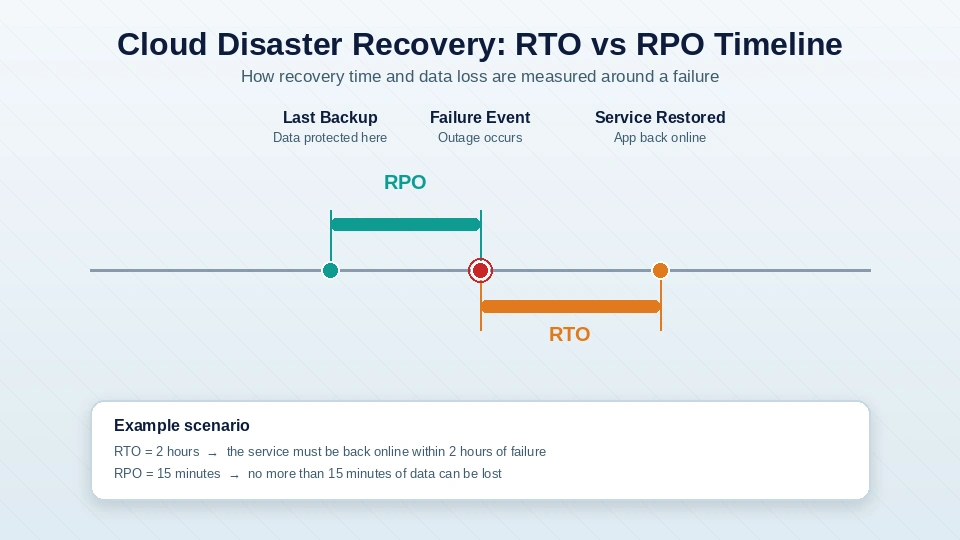
How RTO and RPO Affect Recovery Decisions
|
Requirement |
What It Influences |
|---|---|
|
Short RTO |
Faster recovery systems and failover |
|
Short RPO |
More frequent backup or replication |
|
Longer RTO |
More recovery time is acceptable |
|
Longer RPO |
More recent data loss can be tolerated |
Cloud Monitoring and Operations in Cloud+
Cloud monitoring and operations in Cloud+ focus on keeping systems available, stable, and measurable after they have been deployed.
Important operational concepts include:
- Metrics
- Logs
- Traces
- Alerts
- Performance
- Capacity
- Availability
- Backup
- Scaling
Metrics show measurable details, such as CPU usage and response time. Logs keep a record of events and activities. Traces show the path a request takes as it moves between different services.
Cloud FinOps and Resource Optimization
Cloud FinOps focuses on understanding and controlling cloud spending, for Cloud+, this includes tracking resource usage, using tags, understanding billing, choosing the right resource size, monitoring costs, and assigning resources correctly.
Cloud costs can rise when resources are not reviewed regularly, common examples include oversized virtual machines, unused storage, inactive resources, and services that are no longer needed.
Rightsizing means adjusting resources so they more closely match actual workload requirements.
Other useful cost concepts include:
- Resource metering
- Tagging
- Billing models
- Usage monitoring
- Rightsizing
- Resource allocation
For the Cloud+ exam, the main focus is understanding cost-aware infrastructure decisions rather than becoming a specialist in financial management.
|
Topic |
Do Not Stop at Knowing |
Be Able to Understand |
|---|---|---|
|
Networking |
Definition of DNS |
Why name resolution fails |
|
IAM |
Meaning of least privilege |
Which permissions should be reduced |
|
RTO and RPO |
Definitions |
Which recovery strategy fits a scenario |
|
Containers |
What Kubernetes is |
Why orchestration is needed |
|
IaC |
Meaning of automation |
Why templates reduce configuration differences |
|
Monitoring |
What logs and metrics are |
Which data helps diagnose a problem |
|
Cost |
Meaning of rightsizing |
When a resource is oversized |
|
Security |
Definition of Zero Trust |
Why access should be restricted |
CompTIA Cloud+ Certification Guide for Exam Preparation
Is CompTIA Cloud+ hard to pass?
Cloud+ can be challenging because several areas of IT infrastructure appear in the same exam. Candidates may need to understand networking, storage, security, virtualization, automation, cloud architecture, operations, and troubleshooting. The difficulty depends heavily on previous experience.
A systems administrator who already understands networking, servers, identity, virtualization, and troubleshooting may recognize many concepts. A learner who is completely new to infrastructure may need additional study before moving into scenario-based practice.
A Practical CompTIA Cloud+ Exam Preparation Plan
Effective CompTIA Cloud+ exam preparation should start with the official CV0-004 exam objectives instead of unrelated study materials. A CompTIA Cloud+ Training Program can also provide a structured way to study the exam topics, practical concepts, and real-world scenarios in a clear order.
A practical study sequence is:
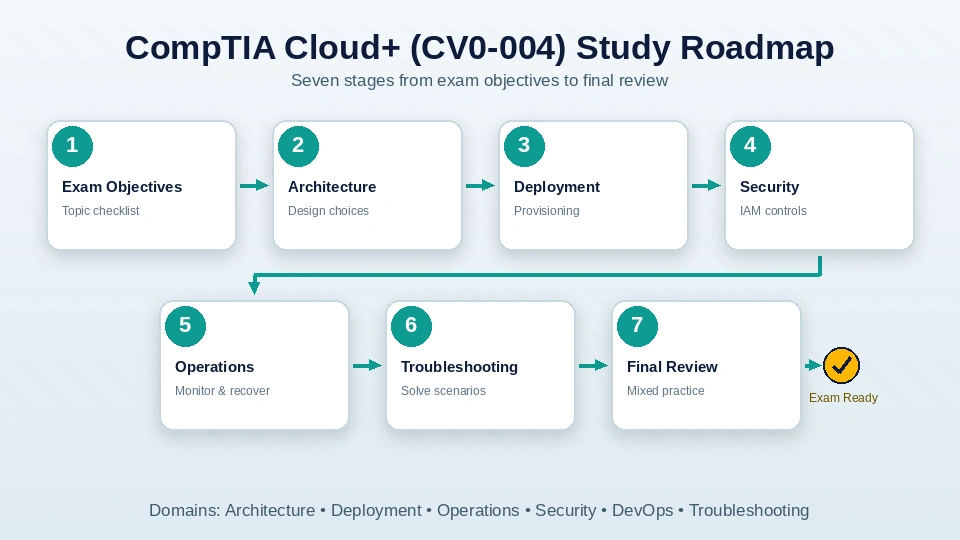
Cloud+ Study Roadmap
|
Stage |
Focus |
Practical Work |
Check Before Moving On |
|---|---|---|---|
|
1 |
Exam objectives |
Create a topic checklist |
Understand all six domains |
|
2 |
Architecture |
Compare design choices |
Explain hybrid vs multicloud |
|
3 |
Deployment |
Provision resources |
Understand deployment methods |
|
4 |
Security |
Practice IAM controls |
Apply least privilege |
|
5 |
Operations |
Monitor and recover systems |
Interpret logs and metrics |
|
6 |
Troubleshooting |
Solve scenarios |
Identify root causes |
|
7 |
Final review |
Mixed practice |
Review weak areas |
Common CompTIA Cloud+ Preparation Mistakes
Several preparation habits can slow progress.
Memorizing Without Applying Concepts
Knowing a definition does not always help when a question asks candidates to choose the best response to a scenario.
Ignoring Networking Fundamentals
Cloud systems still rely on basic networking concepts such as DNS, IP addresses, routing, ports, firewalls, and network connections. A strong understanding of these basics makes cloud troubleshooting easier.
Skipping Hands-On Practice
Reading explains how cloud concepts work, but practical exercises help turn that knowledge into usable skills, setting up resources and solving common problems also makes the concepts easier to remember.
Studying Only One Cloud Provider
Cloud+ is vendor neutral, so preparation should focus on general principles rather than memorizing one platform's service names.
Leaving PBQs Until the End
Performance-based practice should be part of the study plan instead of something attempted only a few days before the exam.
Are You Ready for the CompTIA Cloud+ Exam?
A candidate should be able to answer questions such as:
- Can hybrid cloud and multicloud be explained in simple terms?
- Can common DNS, routing, and firewall problems be identified?
- Can RTO and RPO be explained and their role in recovery planning be understood?
- Can basic JSON and YAML files be read and understood?
- Can IAM, least privilege, and Zero Trust be explained?
- Can metrics, logs, and traces be distinguished from each other?
- Can the difference between containers and virtual machines be explained?
- Can oversized or unused cloud resources be identified?
Cost Career Value Comparison and Renewal
CompTIA Cloud+ Exam Cost and Voucher
The CompTIA Cloud+ exam cost and voucher should be checked before registration because pricing can vary by market, taxes, and the type of package purchased.
Candidates may need to budget for more than the exam itself.
|
Cost Area |
What It Covers |
|---|---|
|
Exam voucher |
Entry to the certification exam |
|
Training |
Optional structured learning |
|
Study guide |
Optional preparation material |
|
Practice tests |
Exam-style question practice |
|
Labs |
Practical cloud exercises |
|
Retake |
Depends on the package selected |
Exam pricing can change, so the current cost should be confirmed from CompTIA before purchasing a voucher.
CompTIA Cloud+ vs AWS Solutions Architect
CompTIA Cloud+ vs AWS Solutions Architect is a useful comparison because the certifications follow different approaches.
|
Factor |
CompTIA Cloud+ |
AWS Solutions Architect Associate |
|---|---|---|
|
Approach |
Vendor neutral |
AWS specific |
|
Main focus |
Cloud infrastructure and operations |
Architecture using AWS |
|
Provider |
Multiple cloud environments |
AWS |
|
Troubleshooting |
Strong operational coverage |
Architecture-centered |
|
Security |
General cloud security |
AWS-specific security |
|
Suitable for |
Broad cloud infrastructure roles |
AWS-focused roles |
- Cloud+ may make more sense when broad infrastructure and multicloud knowledge are important.
- AWS Solutions Architect Associate may be more suitable when a role specifically requires AWS architecture skills.
- Neither certification is automatically better. The right option depends on career direction.
Which Certification Should You Choose?
Choose CompTIA Cloud+ for broad knowledge of cloud infrastructure, operations, troubleshooting, and multicloud environments. Choose AWS Solutions Architect Associate when the main goal is to design and manage solutions specifically within AWS. Both certifications can be useful because they cover different areas of cloud skills.
CompTIA Cloud+ Job Roles and Career Opportunities
When researching CompTIA Cloud+ job roles and salary expectations, candidates should remember that Cloud+ does not lead to one fixed job title or salary level.
|
Job Role |
Typical Responsibilities |
|---|---|
|
Cloud Administrator |
Managing cloud resources |
|
Cloud Engineer |
Building and maintaining cloud infrastructure |
|
Systems Administrator |
Managing servers and operating systems |
|
Cloud Operations Specialist |
Monitoring and service availability |
|
Infrastructure Engineer |
Managing compute, network, and storage systems |
There is no single salary that applies to every Cloud+ professional.
Salary depends on factors such as:
- Job title
- Experience
- Location
- Employer
- Technical skills
- Cloud platform knowledge
- Additional certifications
A Cloud Administrator and a Cloud Engineer may have different responsibilities and salary ranges even when both hold the same certification.
Does CompTIA Cloud+ qualify for DoD 8140?
Yes, CompTIA Cloud+ can apply to certain DoD 8140 workforce roles, but it does not automatically satisfy the qualification requirements for every DoD cybersecurity position.
Choose CompTIA Cloud+ for broad knowledge of cloud infrastructure, operations, troubleshooting, and multicloud environments, choose AWS Solutions Architect Associate when the goal is to design solutions specifically for AWS. Both certifications can be valuable because they cover different areas of cloud knowledge.
Professionals working toward DoD positions should check the current qualification matrix for the exact work role and level required by their organization.
Is CompTIA Cloud+ worth it?
Cloud+ can be worth considering for professionals who want broad cloud infrastructure knowledge without limiting their studies to one provider.
It may be particularly useful for:
- Systems professionals moving into cloud roles
- Network professionals working with cloud infrastructure
- Cloud administrators
- Infrastructure engineers
- Professionals working in hybrid environments
- People supporting multiple cloud platforms
A vendor-specific certification may be more suitable when a target role focuses entirely on AWS, Azure, or Google Cloud.
Cloud+ is most valuable when certification study is supported by practical experience with networking, security, cloud resources, monitoring, automation, and troubleshooting.
How to renew CompTIA Cloud+ Certification
Understanding How to renew CompTIA Cloud+ certification is important because the credential is not designed to remain active permanently without renewal.
Certification holders should:
- 1. Check the current expiration date.
- 2. Review CompTIA continuing education requirements.
- 3. Choose an accepted renewal method.
- 4. Complete qualifying activities.
- 5. Maintain supporting records when required.
- 6. Submit applicable continuing education information.
- 7. Confirm that the certification has been renewed.
Renewal requirements and fees can change, so the latest CompTIA guidance should always be checked before beginning the renewal process. Professionals comparing broader cloud and IT certification paths can also refer to SterlingNext Cloud Certification Learning for training options across cloud, infrastructure, and related technology areas.
Conclusion
The CompTIA Cloud+ Certification Guide shows that CV0-004 covers more than basic cloud terms, it includes cloud architecture, deployment, daily operations, security, DevOps basics, and troubleshooting across different cloud environments. Professionals with networking or systems experience may already be familiar with some of these areas, while beginners may need extra time to build basic knowledge and practice with cloud systems, practical study plan should follow the official exam objectives and include real-world scenarios, cloud configuration, monitoring, security, and troubleshooting. Before registering for the exam, check the current exam fee and renewal requirements, Cloud+ can help build skills for roles in cloud administration, infrastructure, hybrid cloud operations, and cloud engineering.
Get Certified With Industry Level Projects & Fast Track Your Career
Checkout Top 10 Highest Paying Jobs
Frequently Asked Questions
Cloud+ can be studied by beginners, but networking, server, virtualization, security, and troubleshooting knowledge can make preparation easier. CompTIA recommends practical systems administration or cloud engineering experience, showing that CV0-004 is more technical than a basic cloud fundamentals exam.
Cloud+ is not mainly a coding certification. However, candidates should understand automation, Infrastructure as Code, APIs, source control, JSON, YAML, and CI/CD concepts. Basic scripting knowledge can therefore make several topics easier to understand.
Preparation time depends on prior knowledge and available study time. Those with experience in networking, system administration, or cloud technology may need less time. Beginners may need more time to learn the basics and practice these skills through hands-on labs.
Cloud+ covers a wider range of topics than Network+. It includes networking along with cloud architecture, deployment, security, operations, DevOps, and troubleshooting. Network+ focuses mainly on networking concepts and skills. Because of this, candidates who know networking but have little cloud experience may find Cloud+ more challenging.
Yes. Cloud+ focuses on general cloud infrastructure concepts rather than one provider's products. This makes its knowledge relevant to professionals working across different platforms or in hybrid and multicloud environments.
Yes. CV0-004 includes performance-based questions along with multiple-choice questions. These items test whether candidates can apply technical knowledge to practical scenarios involving areas such as configuration, networking, security, deployment, and troubleshooting.
Cloud+ covers many of the skills used in cloud engineering, including cloud architecture, deployment, networking, operations, automation, security, and troubleshooting. The certification provides a strong knowledge base, but practical experience is also important. Hands-on labs and work with real cloud environments can help build the skills needed for cloud engineering.
There is no fixed order for taking these certifications. Cloud+ can be a good starting point for learning general cloud concepts that apply across different platforms. An AWS certification may be a better first choice when a job specifically requires AWS skills.
The CV0-004 passing score is 750 on CompTIA's scoring scale. Candidates should also check the latest official exam page before registration in case exam policies or details are updated.
A useful guide should cover the CV0-004 exam format, major topics, suggested experience, and performance-based questions, it should also cover cloud architecture, security, automation, troubleshooting, study approaches, career paths, exam costs, vendor-specific certifications, and certification renewal.