
Training Outcomes Within Your Budget!
We ensure quality, budget-alignment, and timely delivery by our expert instructors.
Table of Content
- Character AI Chat Error Complete Guide
- What Is Character AI?
- What Does a Character AI Chat Error Actually Mean?
- Causes of Character AI Chat Errors
- Types of Character AI Chat Errors
- How to Fix Character AI Chat Error: Step-by-Step Solutions
- Character AI Alternatives When Down
- Conclusion
- You might also like
Recent Blogs
Azure AZ-104 Exam Study Guide: Pass on First Attempt
August 21st, 2026
AWS SysOps Administrator Certification Guide
August 20th, 2026
Cloud Computing Salary Guide 2026: AWS, Azure & GCP
August 20th, 2026
CompTIA Cloud+ Certification: Complete Guide
August 20th, 2026
ISO 31000 vs ISO 27001
August 20th, 2026
CISM Certification Cost and Roadmap for Career Success
August 19th, 2026
CISSP Exam Format & Domains
August 19th, 2026
Closer Look at CISSP Requirements That Truly Matter Most
August 19th, 2026
CISSP Certification Path Steps For Aspiring Security Leaders
August 19th, 2026
CISSP Certification Benefits That Support Career Growth
August 19th, 2026
AWS DevOps Engineer Certification: Complete Guide
August 18th, 2026
AWS Developer Certification: Study Guide & Exam Tips
August 18th, 2026
ISO 22000 Documentation Requirements
August 18th, 2026
ISO 22000 vs HACCP
August 17th, 2026
PMP Exam July 2026: What's Changed and How to Prepare
August 17th, 2026
Character AI Chat Error: Causes and Fixes
Last updated on July 30th, 2026
- Share
-

-

-

-

-

 Sachin Kumar
Character AI is an app and website where you can chat with AI characters. People use it for fun conversations, roleplay, creative writing, or just to talk with different characters.
Character AI Chat Error Complete Guide
Introduction
If you've ever been chatting with your favorite Character AI bot and the conversation stops, you're not alone. A Character AI chat error can be frustrating. As Digital Technology and AI continue to become a bigger part of everyday life, platforms like Character AI make conversations more interactive, but they can still run into technical problems. You might see a blank screen, an error message, or your messages may stop sending. Most of the time, these issues happen because of internet problems, busy servers, or login issues, not because you did anything wrong. In this guide, you'll learn what these errors mean, why they happen, and how to fix them.

What Is Character AI?
Character AI is an app and website where you can chat with AI characters. People use it for fun conversations, roleplay, creative writing, or just to talk with different characters. When you send a message, it goes to Character AI's servers, where the AI reads it, creates a reply, and sends it back to you. If something goes wrong during this process, you may see a chat error instead of a response.
How a Message Travels Behind the Scenes
Understanding this journey helps explain why errors happen at all:
- Your device sends the message to Character AI's servers
- The server processes it through the AI model
- A response is generated and sent back to your screen
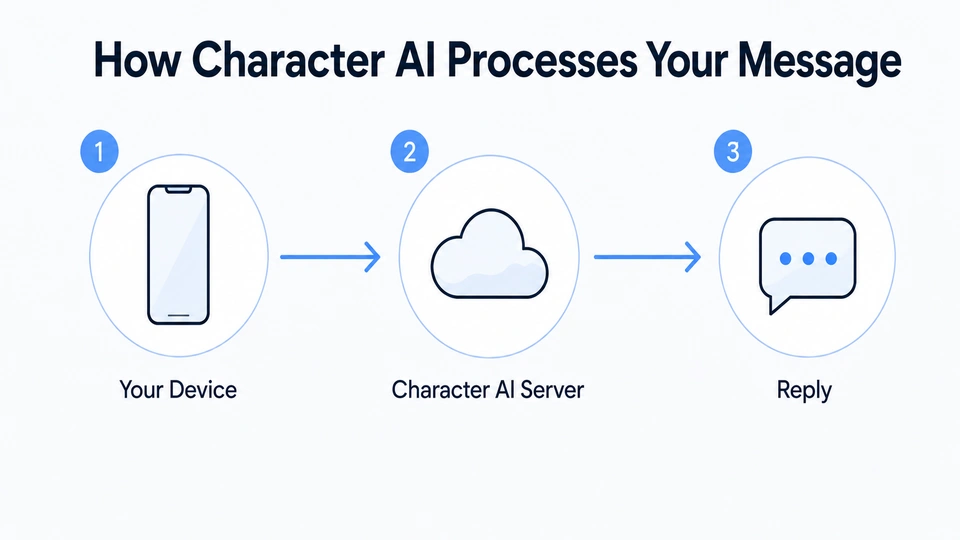
If any step in that chain breaks, you see an error instead of a reply. That's the root of almost every issue covered in this guide. Beginners often assume something is wrong with their account or device, but the process involves multiple systems working together, and any one of them can slow down or fail temporarily.
What Does a Character AI Chat Error Actually Mean?
A chat error means something in that pipeline didn't go as planned. It could be a message that never sends, a reply that never loads, or a warning that appears out of nowhere.
Common First Signs
The most common first sign is a Character AI. Something went wrong, and a message popped up where a reply should be. It's vague on purpose, since it covers many different underlying issues at once.
Recognizing a Red Text Error
You might also come across the Character AI red text error. Instead of getting a reply, your message appears in red. This usually means the message didn't go through, so the bot couldn't answer. That's different from a loading screen, which simply means Character AI is still working on a response. If you see red text, send the message again or refresh the page. Once you know what the error means, it's much easier to fix.
Causes of Character AI Chat Errors
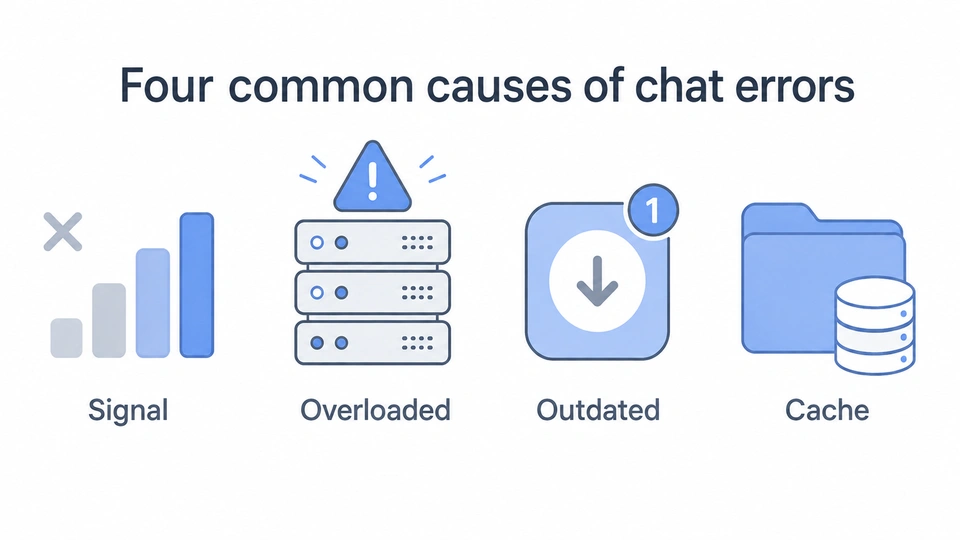
If you've restarted Character AI and the chat errors are still there, you're probably wondering what's going on. In most cases, there isn't just one thing causing the problem. Instead, it's usually a combination of small issues. These problems can generally be grouped into two main categories.
Server-Side Factors
- Busy servers: When too many people use Character AI at the same time, the servers can slow down or stop responding.
- Content filters: Sometimes Character AI's safety filters mistakenly block a normal message, which can interrupt the chat.
- Server bugs: Like any app, Character AI can have temporary bugs or technical problems that cause chat errors.
Device and Connection Factors
- Unstable internet: A Character AI network error can come from weak signal or switching networks mid-conversation
- Outdated app or browser: Older versions may not work well with backend updates
- Local cache issues: Corrupted or overloaded cache quietly disrupts sending and loading
If errors follow a pattern, such as every few messages or only at certain times of day, the cause is likely server-side rather than on your device. This is a useful shortcut when deciding whether to keep troubleshooting locally or wait it out.
Types of Character AI Chat Errors
Not all errors look the same. Here's a breakdown of the ones beginners run into most often, along with what each one typically signals.
Quick Reference: Common Character AI Errors
|
Error Type |
What It Means |
Quick Fix |
|---|---|---|
|
Something Went Wrong |
Generic failure message |
Refresh chat or retry |
|
Empty Response Error |
Backend returned no text |
Shorten prompt, refresh |
|
Moderated Label / Chat Lock |
Content filter flagged thread |
Start a new thread |
|
Messages Not Sending |
Connection or server drop |
Close and reopen app |
|
Internal Server Error 500 |
Backend broke unexpectedly |
Wait for it to be patched |
|
Service Unavailable 503 |
Servers overloaded |
Retry after a few minutes |
|
Backend API Timeout |
Response took too long |
Try a shorter message |
|
Rate Limiting Error |
Too many requests too fast |
Slow down message rate |
|
Stuck Loading Screen |
Weak connection/server lag |
Force-close and reopen app |
|
Chat History Not Loading |
Sync issue after update |
Log out and back in |
|
Login Loop |
Expired session token |
Clear cache, log in fresh |
Something Went Wrong
This is Character AI's generic catch-all message. A Character AI something went wrong alert can mean almost anything, from a dropped connection to a minor backend hiccup that resolves within seconds.
Empty Response Error
Sometimes Character AI tries to send a reply, but nothing appears in the chat. This is known as a Character AI empty response error. In most cases, it's caused by a temporary issue on Character AI's side rather than anything you typed.
Moderated Label or Chat Lock
Sometimes a conversation is flagged by Character AI's content filters. When that happens, you may see a Character AI moderated label chat lock, and the bot will stop replying in that chat. This only affects the conversation that was flagged, not your entire account.
Messages Not Sending
Your text sits in the box or shows a failed icon next to it. Character AI messages that aren't sent are often linked to connection drops or temporary server overload, rather than to anything typed incorrectly.
Internal Server Error 500
A Character AI internal server error 500 means something broke unexpectedly on the backend while handling your request. There's nothing to fix on your side; waiting until it's patched is usually the only option.
Service Unavailable 503
If you see a Character AI service with an unavailable 503 message, it usually means the servers are too busy to handle new requests at that moment. Waiting a few minutes and trying again often fixes the problem once the traffic slows down.
Backend API Timeout
If you see a Character AI backend API timeout means your request reached the server, but it took too long to generate a reply. This can happen when the servers are busy or the response is more complex than usual. Sending a shorter message and trying again may help.
Rate Limiting Error
If you see a Character AI rate limiting error usually appears when too many messages or retries are sent in a short time. The system temporarily slows things down to handle the traffic. Waiting for a minute before sending another message is often enough to fix it.
Stuck Loading Screens
Getting Character AI stuck on the loading screen is common on mobile devices, often due to a weak connection or a temporary server slowdown affecting many users at once.
Chat History Not Loading
When old chats won't appear, Character AI fails to load chat history, and it often happens right after an app update changes how data syncs.
Network Drops Mid-Chat
A Character AI network error can interrupt the handshake between your device and the server before the chat even finishes loading, leaving the screen frozen.
Login Loops
Getting logged out repeatedly needs a Character AI login loop fix, and this usually starts with clearing expired session tokens rather than changing your password.
Understanding the authentication and secure access concepts covered in.CompTIA Security+ Certification can also help explain why login and session-related issues occur. Before assuming the fault is yours for any of these, check Character AI server status through community forums, social media, or third-party status trackers. If others are reporting the same thing, it's simply a matter of waiting it out.
How to Fix Character AI Chat Error: Step-by-Step Solutions
If you're seeing a Character AI chat error, start with the easiest fixes before trying anything more advanced. Going through these steps one by one can help you find the problem and get your chats working again.
- 1. Check your connection: Switch between Wi-Fi and mobile data, or restart your router.
- 2. Clear your cache: Here's how to clear the cache for Character AI:
- Mobile: App settings → Character AI → Clear Cache
- Browser: Settings → Privacy → Clear cached images/files
- Restart the app afterward.
- 3. Empty response: Sometimes Character AI doesn't display a reply even though it tries to generate one. If that happens, refresh the chat and send a shorter message to see if it works.
- 4. Moderation lock: If a conversation has been locked by Character AI's content filters, starting a new chat is usually more effective than repeatedly using the same thread.
- 5. Resolve sending failures: If Character AI messages are not sending, fully close and reopen the app.
- 6. Unstick a loading screen: For Character AI stuck on the loading screen, force-close the app and clear background processes.
- 7. Recover chat history: If Character AI failed to load chat history. Log out and back in to force a fresh sync.
- 8. Break a login loop: Apply this Character AI login loop fix by clearing saved credentials and logging in fresh.
- 9. Wait out server issues: Check Character AI server status and give it time to stabilize.
- 10. Watch for patterns: If a Character AI red text error occurs at the same time each day, it's likely tied to peak traffic hours.
Character AI Alternatives When Down
Character AI doesn't always come back online right away. If you've already waited for a while, it may be worth trying another AI chatbot instead of sitting around. That way, you can keep writing, roleplaying, or brainstorming until Character AI is working again.
- Other AI companion and roleplay platforms
- General-purpose chatbots with character customization features
- Community-run Discord bots built specifically for roleplay.
None of these fully replace Character AI's unique style or character depth, but they work as useful stopgaps. Most people treat Character AI alternatives when down as a short-term backup rather than a permanent switch, returning once the original platform stabilizes.
While most Character AI chat errors can be resolved with simple troubleshooting, having a basic understanding of the technology behind AI platforms, networking, and online systems can make it easier to identify similar issues in the future. SterlingNext Technology and AI Resources include information on these topics, as well as networking, cybersecurity, and other digital technologies.
Conclusion
Getting a Character AI chat error in the middle of a conversation can be annoying, especially when everything was working a moment ago. In most cases, the problem comes down to a few common causes, such as an unstable internet connection, busy servers, or temporary app data issues. The good news is that these problems are usually easy to fix, even if you're not very technical. First, check your internet connection. If the problem continues, clear your app or browser cache. If Character AI's servers are having issues, you'll usually just need to wait until they're working again.Following these simple steps can help you get back to chatting without spending too much time trying random fixes.
You might also like
Get Certified With Industry Level Projects & Fast Track Your Career
Checkout Top 10 Highest Paying Jobs
Frequently Asked Questions
Restarting your device fixes small issues like temporary glitches, cached files, or memory problems. However, if Character AI's servers are having problems, the chat error will remain until the service is restored.
Usually, no. Chat errors are most often caused by busy servers, internet connection problems, or temporary issues on Character AI's side. In most cases, your message or anything you did during the conversation isn't the cause.
It depends on the problem. Small glitches are often fixed within a few minutes, while larger server outages may take hours. Checking the service status can give you the latest updates.
No. Clearing the cache only deletes temporary files that help the app or website load faster. It does not erase your conversations. Your chats are saved on Character AI's servers, so they will still be there after you clear the cache.
Sometimes a normal message gets flagged by mistake because of the way it is written or understood. If that happens, try starting a new chat. In many cases, the conversation will work normally again.
Yes. A VPN can sometimes slow your connection or make it less stable, which may cause chat errors. Turning it off for a while can help you see if it's causing the problem.
Close the app completely and open it again instead of just minimizing it. It's also worth checking that your Wi-Fi or mobile data is stable, since a weak connection can sometimes lead to chat errors.
Not usually. Login loops are often caused by temporary sign-in problems instead of a wrong username or password. Clearing the cache and signing in again usually fixes the issue.
Check community forums, social media, or a status website for Character AI. If many people are reporting the same issue at the same time, the problem is likely on Character AI's side.
Not necessarily. Many people use another platform only while Character AI is having problems. Once the service is working normally again, they usually switch back.